Part of the OSAI Prep series → — HTB writeups mapped to OWASP LLM Top 10.
Machine Summary
| Field | Value |
|---|---|
| Platform | HackTheBox |
| Difficulty | Very Easy |
| OS | Linux |
| Vulnerability | Anonymous FTP login enabled |
| OWASP Mapping | A05 — Security Misconfiguration |
Reconnaissance
Initial port scan:
nmap -sC -sV 10.129.1.14Single open port: FTP on port 21, running vsftpd 3.0.3. The nmap scripts flag it immediately — anonymous FTP login is allowed.
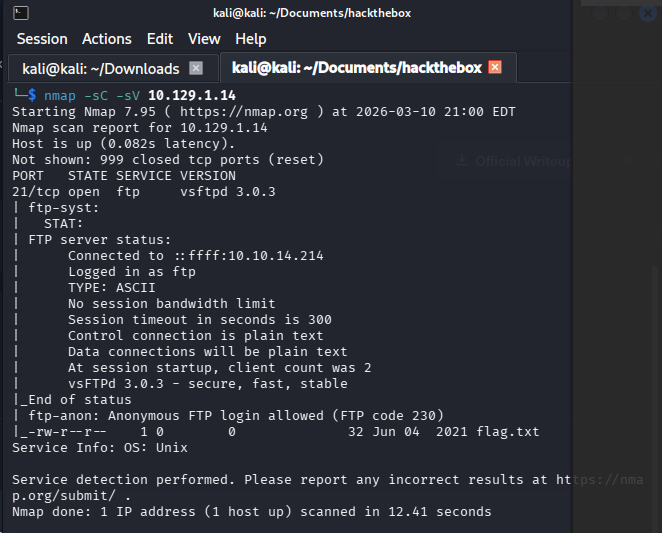
Anonymous FTP is a configuration that lets any user connect with the username anonymous and any string as a password. It was designed for legitimate public file distribution — software mirrors, open datasets. On this machine it’s left enabled on a server that has no business being publicly accessible.
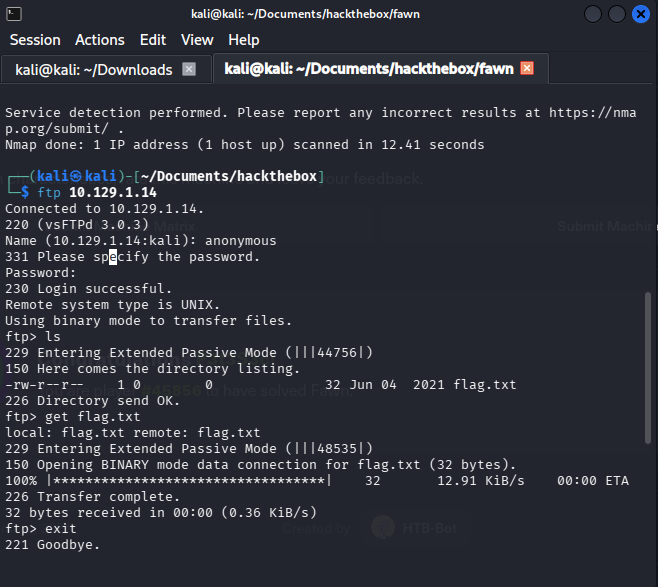
We connect using anonymous credentials and log in successfully. Standard FTP enumeration from there — list files, download anything readable, retrieve the flag. No further exploitation needed. Anonymous access was the full attack surface.
Privilege Escalation
Not required. Anonymous FTP gave us direct read access to the target file — no credentials cracked, no shell obtained, no lateral movement necessary. The misconfiguration was the entire vulnerability.
Root Cause
vsftpd 3.0.3 ships with anonymous login disabled by default. Someone explicitly set anonymous_enable=YES in the vsftpd configuration — either for a legitimate use case that was never cleaned up, or a test setting that made it to production. The result is a server that hands read access to anyone on the network who asks.
The AI Equivalent
OWASP LLM Top 10 Mapping: LLM06 — Sensitive Information Disclosure
Anonymous FTP was designed as a feature — easy public file distribution — that became a liability when left enabled on the wrong server. The identical failure pattern appears constantly in LLM deployments: Chroma, Weaviate, and Qdrant instances spun up in development mode without authentication, then promoted to production without anyone closing the door.
Anyone who can reach port 8080 can query the entire corpus, retrieve embedded documents, and reconstruct proprietary data through similarity search. The anonymous_enable=YES line and the missing API key are structurally the same decision — someone chose openness for convenience and never revisited it. The asset changed (files versus embeddings) but the access control failure is identical.
Lessons Learned
- Disable anonymous FTP explicitly. vsftpd ships with it off — if it’s on, someone turned it on. Audit who and why, then set
anonymous_enable=NO. - Use SFTP or SCP instead of FTP. FTP transmits credentials and data in plaintext. SFTP uses SSH encryption. There is no scenario in 2026 where plain FTP is the right choice.
- Restrict file transfer services to known IPs. If a legitimate use case requires FTP, bind it to a specific source IP via firewall rules — not open to the network.
- Scan your own perimeter regularly.
nmap -sC -sVon your own IP range catches exactly this — an exposed service that shouldn’t be there. If you don’t scan yourself, someone else will. - Apply the same logic to vector databases. Chroma, Weaviate, Qdrant, and Milvus all have authentication mechanisms. The default dev configuration often leaves them disabled. Treat your embedding store like a database — it holds your users’ data, even if it looks like floating numbers.